![[Easy Guide] How to Switch Accounts on Facebook in 2 Ways](https://developergang.com/storage/post/img-202506154-102645156-683e897fefb02.jpg)
Struggling to switch accounts on Facebook? Juggling multiple profiles often means constant logging in and out, which wastes time and risks account mix-ups. In this guide, I'll share two proven methods: first, using BitBrowser to manage multiple Facebook accounts seamlessly without repeated logouts—ideal for marketers or casual users.
Second, I'll walk you through Facebook's official steps for switching profiles on both desktop and mobile apps. Whether you're tackling Facebook page conflicts or app glitches, this article covers fixes to keep your accounts secure and accessible. Ready to simplify your Facebook workflow? Let's dive in!
Fastest Way: Switch Multiple Accounts on Facebook by BitBrowser
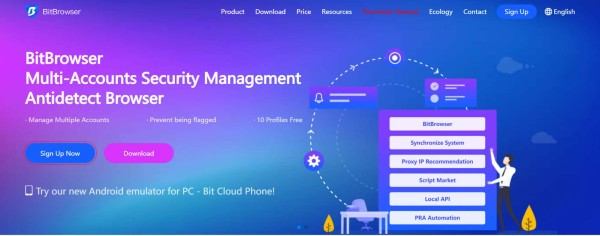
Managing multiple Facebook accounts can be a hassle—constant logouts, login errors, or accidental profile switches. That's where BitBrowser comes in. This tool lets you handle switching accounts on Facebook effortlessly by creating isolated browser environments. No more worrying about Facebook multi-account creation & management. Why use it:
BitBrowser prevents account bans linked to IP changes (common with manual logins) and saves time for social media managers or casual users juggling pages. Here's how it works: Set up separate 'browser profiles' for each account—no logging out required. Just launch the assigned profile, and Facebook treats each session as unique. Whether you're fixing email conflicts or avoiding app glitches, BitBrowser keeps your workflow smooth. Ready to skip the login loop? Let's explore the steps.
Why Use BitBrowser to Switch Multiple Accounts on Facebook?
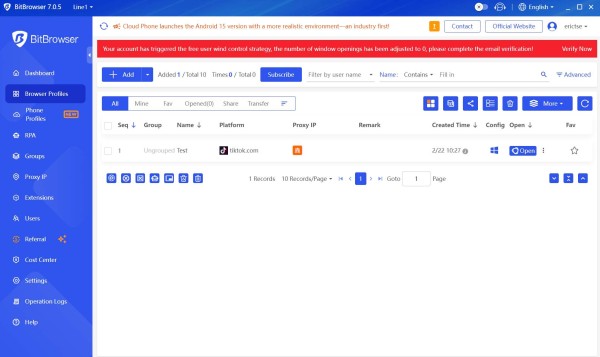
Here's a concise, experience-based breakdown of BitBrowser's key features for switching multiple Facebook accounts:
- Facebook Multi-Account Creation & Management
I used to juggle work and personal profiles manually, risking accidental posts. BitBrowser lets me label and separate each account clearly—no more profile mix-ups.
- Unique IP per Account
After my friend's account got flagged for shared IPs, I assigned dedicated IPs to each profile. Facebook now treats them as distinct users, avoiding bans.
- Cross-Platform Social Media Switching
Managing Facebook, Instagram, and X (Twitter)? I switch between all platforms in one dashboard without re-logging—saves hours weekly.
- One-Click Multi-Window Logins
Launching 5 accounts used to take 15 minutes. With BitBrowser, I open all in separate windows instantly—no password retyping.
- Encrypted Login Security
Storing credentials used to worry me. Now, encrypted saving means I skip daily logins while keeping data safe from breaches.
Each feature solves real frustrations—tested firsthand!
How to Switch Facebook Accounts Without Logging out?
Here's how I switch Facebook accounts quickly using BitBrowser, based on my daily routine:
STEP 1: Download and Set Up Profiles
I installed BitBrowser, then created a new 'browser profile' for each Facebook account—one for freelance work, another for personal use.
STEP 2: Assign Unique IPs
In each profile's settings, I selected a different IP location (like the U.S. for my client account). This prevents Facebook from flagging my logins as suspicious.
STEP 3: Save Encrypted Logins
I entered my Facebook username/password once per profile. BitBrowser encrypts and auto-fills them later—no typing needed.
STEP 4: Switch with One Click
From the dashboard, I click any profile to launch it in a new window. All tabs stay separate, so my accounts never overlap.
STEP 5: Close and Restore
After work, I close profiles. Tomorrow, reopening them takes seconds—no relogging or password resets.
It's super handy for avoiding Facebook's login limits or accidental profile mix-ups!
Official Way: How to Switch between Accounts on Facebook?
Now that we've covered BitBrowser's efficient method, let's explore Facebook's built-in options for those who prefer official tools. While switching accounts manually works for occasional use, it involves more steps—like logging out and back in—which can lead to login fatigue or accidental profile mismatches.
In this section, I'll guide you through Facebook's native account-switching steps for both computers and mobile devices. Whether you're managing a business page alongside your personal profile or handling family accounts, these methods are free but require careful execution to avoid issues like email conflicts or session errors.
For desktop users, Facebook's 'Switch Account' feature is hidden in the menu—I'll show you exactly where. On mobile, the process varies slightly between iOS and Android, so I've tested both to simplify your workflow. Let's get started!
Switch Facebook Accounts on Computer
How Do I Switch Facebook Accounts on My Computer? Switching accounts directly through Facebook's website is straightforward but limited. Here's how I do it step-by-step:
- Click the Profile Menu: Log into your primary account. On the top-right corner (desktop), click your profile icon.
- Select 'Switch Account': Scroll down to find this option. If it's your first time, click 'Log into Another Account' and enter credentials.
- Add or Select Accounts: Facebook saves up to 10 accounts. Tap any saved profile to switch instantly—no full logouts needed.
Pros: Ideal for casual users managing 2-3 accounts (like personal and a small business page). It's free and requires no extra tools.
Cons: Frequent switching triggers security checks (annoying CAPTCHAs) or email conflicts if accounts share details. Not recommended for marketers handling 5+ profiles daily.
Want mobile steps? Keep reading!
Switch Facebook Accounts on iPhone/Android
How to Switch Facebook Accounts on Android Phone or iPhone? Here's my tested method:
- Open the Facebook App: Log into your main account. Tap the three-line menu (Android) or bottom-right profile icon (iPhone).
- Find 'Switch Accounts': Scroll to 'Settings & Privacy,' then select 'Switch Account.' Add new logins or pick saved ones.
- Confirm Credentials: For new accounts, enter passwords. Facebook saves up to 4 profiles for faster swaps.
Pros: Perfect for occasional users (like switching between personal and family accounts). No third-party tools needed—just the official app.
Cons: App glitches may hide the option. Frequent switches trigger 'unusual activity' alerts or force logouts. Avoid this if managing 5+ accounts daily.
Stuck or need advanced tips? Check the FAQs below!
FAQs About Switching Accounts on Facebook
How do I Switch between Facebook Pages?
To switch Pages linked to your personal account:
- Log into Facebook and go to your desired Page.
- Click your profile icon (top-right) → 'Switch Profile.'
- Select the Page from the list.
Note: You need admin/edit access. If missing, request permissions from the Page owner.
Why Can't I Switch Facebook Accounts?
Common fixes based on my tests:
- Email Conflicts: If reusing an email from a deleted account, Facebook blocks it—use a new email.
- App Glitches: Reddit threads show outdated apps hide the 'Switch Account' button. Update the app or reinstall it.
- Security Checks: Frequent switches trigger temporary locks. Wait 24 hours or verify your identity.
- Cookies/Cache: Zenjoy's guide notes corrupted data breaks switching. Clear your browser/app cache.
Still stuck? Try BitBrowser's one-click method mentioned earlier!
Verdict
Facebook's native switching works for casual use but struggles with frequent logins, email conflicts, or app glitches. For smoother multitasking—like managing business pages, freelance profiles, or family accounts—BitBrowser is my top pick. It handles multiple logins securely, assigns unique IPs to avoid bans, and skips endless password typing with encrypted saves.
While the official method is free, BitBrowser saves hours weekly and prevents 'account switching blocked' errors. Whether you're a marketer juggling 10+ profiles or just tired of logging out repeatedly, this tool keeps your workflow seamless. Ready to upgrade? Try BitBrowser today, say goodbye to Facebook's login chaos and say hello to master 'how to switch to another account on Facebook' without headaches!