AI-powered mobile apps are becoming a new normal in various industries. AI has transformed the entire mobile app development lifecycle with significant upgrades. Companies introduce AI features that exceed user expectations and elevate business growth.
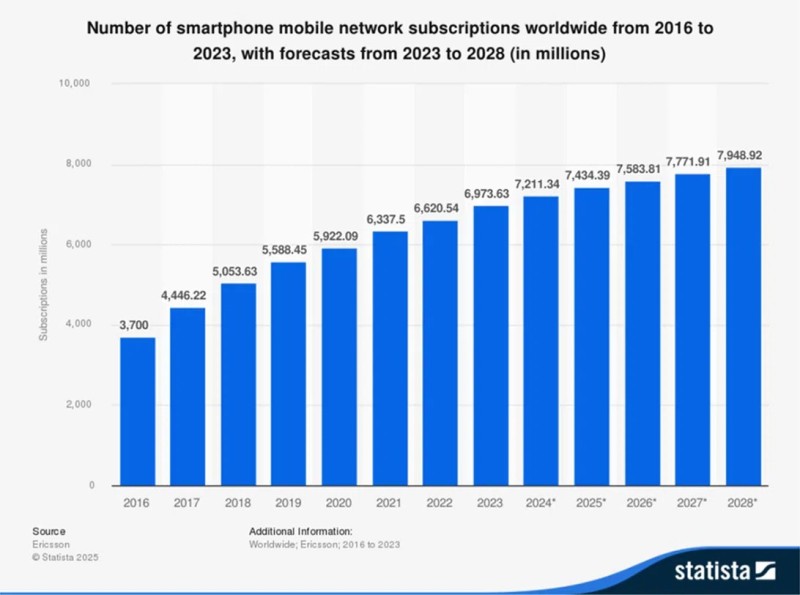
Statista reported that there are more than 7 billion smartphone mobile network subscriptions worldwide in 2025, projected to reach 7.8 billion by 2028. This data reflects the need for building an advanced mobile app to reach a wider audience and maximize profits.
But businesses struggle to build innovative apps for multiple platforms. That's where Flutter comes into play, enabling businesses to build intuitive and responsive apps with AI integration. The synergy of AI and Flutter is now transforming mobile application development. This blog dives deep into Flutter AI integration to explore how this cross-platform development framework is enabling businesses to build next-gen applications.
Why Businesses Should Invest In AI-Powered Flutter Apps?
To compete in today's fast-paced world, companies look for ways to deliver advanced digital products. Flutter AI integration allows you to offer personalized experiences, simplify decision-making processes, and improve overall efficiency. Here's why businesses should invest in this advanced technology:
-
Cross-Platform Compatibility
Flutter is a brilliant framework that allows developers to build apps for mobile and desktop platforms using a single codebase. It allows you to integrate AI features into Flutter apps to ensure a smooth and consistent user experience across multiple platforms. This results in saving a lot of time and effort in app development.
-
Enhanced User Engagement
AI-powered features like personalized recommendations and intelligent chatbots are very useful in boosting user engagement. By analyzing user behavior and preferences, Flutter apps integrated with AI can offer customized content and services that impress each user. This personalization leads to better user satisfaction and retention rates. However, you need to hire app developers with years of experience to include advanced personalization.
-
Better Decision-Making Abilities
AI algorithms are trained to handle large amounts of data and extract useful insights to help users make better decisions. With AI integrated into Flutter apps, businesses can take advantage of data-driven decision-making. This allows businesses to optimize their marketing strategies, predict demand, and spot patterns in user behavior.
-
Smooth Integration With ML Libraries
Flutter is a popular platform among developers to build mobile apps that use machine learning. It allows seamless integration with popular ML libraries like TensorFlow Lite, allowing developers to easily implement AI models into their apps. From image classification to object detection, Flutter's integration with ML libraries allows businesses to use advanced features quickly. This results in a more engaging, smart, and user-focused application.
-
Smarter Automation
Automation is necessary to optimize work efficiency and save time. With adaptable architecture and AI integration, businesses can automate repetitive tasks like data input, image recognition, and language processing. This results in enhanced productivity for the development team because they get time to focus on more important tasks or projects.
How To Integrate AI With Flutter?
Now that you have understood why a business owner should invest in AI-powered Flutter apps, it’s time to get introduced to the highlight of the topic. Here are the easy steps to integrate Flutter with AI:
-
Install The Right AI Library
A right AI library plays a crucial role for developers. TensorFlow Lite and Google ML are some of the most popular libraries for on-device AI processing with their powerful features. However, services like Firebase ML, OpenAI, and Dialogflow enable the most powerful models for difficult tasks like NLP, advanced chatbots, and image generation. An experienced Flutter app development company always chooses the right library to build a user-friendly mobile app with advanced capabilities.
-
Load AI Model
Once you have successfully installed libraries, the next step is to set up the 'AI Model.' These models are necessary for greater output; they can be pre-trained or custom-trained. From recognizing faces to generating a chatbot response, the determind model can get you desired results. However, pre-trained models are faster to integrate, and they offer flexibility.
-
Process Data With AI
Once you load the AI model into Flutter, you should focus on data processing. The data is the user input and can be in the form of text, image, audio, etc. This step is essential for AI to process data and generate meaningful results. The input data may vary in every model. For an on-device model, an image can be sent to a face detector, but on the cloud-based model, input involves a prompt or a message, and the server returns a response.
-
Display Output
This step is necessary to make and feel AI results natural and responsive. It creates a smooth and intuitive user experience while making AI interactive. You can use widgets like FutureBuilder or StreamBuilder to make the UI responsive.
-
Better Performance
The AI computation needs to be optimized, especially when handling large models or performing tasks on limited mobile devices. AI requires significant resources to ensure your app remains smooth. By making informed decisions during AI usage optimization, you can ensure that your app remains efficient, responsive, and enjoyable to use, even while performing advanced tasks.
Real-Life Examples of Flutter AI Integration
The integration of AI into Flutter isn't a futuristic concept. Many businesses are transforming their mobile apps with this advanced integration. Here are some real-life examples:
Google Lens
This application makes use of modern computer vision technology, which enables it to detect objects and locations instantly. Google Lens provides users with an elevated interactive experience because it merges physical elements with digital components smoothly. Google Lens showcases AI integration through its ability to identify landmarks and scan text, and recognize products within Flutter.
Amazon Lex
The Flutter framework demonstrates advanced natural language processing (NLP) abilities through Amazon Lex applications. Through human-like conversation interfaces, Amazon Lex allows developers to develop chatbots and virtual assistants that understand user queries and provide natural responses.
Vivafit
The fitness application Vivafit brings a new fitness app approach, which uses AI and computer vision to deliver customized workout sessions. AI algorithms within Vivafit assess user movements to deliver immediate feedback and adapt workouts according to personal preferences and goals. Vivafit provides an innovative home fitness experience through its combination of dance elements and enjoyable features, which create emotional connections with users.
Conclusion
The compatibility of AI with Flutter is driving next-gen innovations in mobile app development. This fusion is enabling smarter, faster, and more personalized user experiences, meeting user expectations. With Flutter AI integration, businesses can build future-proof apps and fuel sustainable growth. However, you need to partner with an experienced Flutter app development company to leverage this powerful synergy of Flutter and AI and deliver high-performance, intelligent mobile solutions.